 MatsClocks
PowerPoint Presentation Clocks
⏰ Time Now in Toronto Canada
Time Now in Toronto Canada in a PowerPoint Clock (MatsClocks 3040)
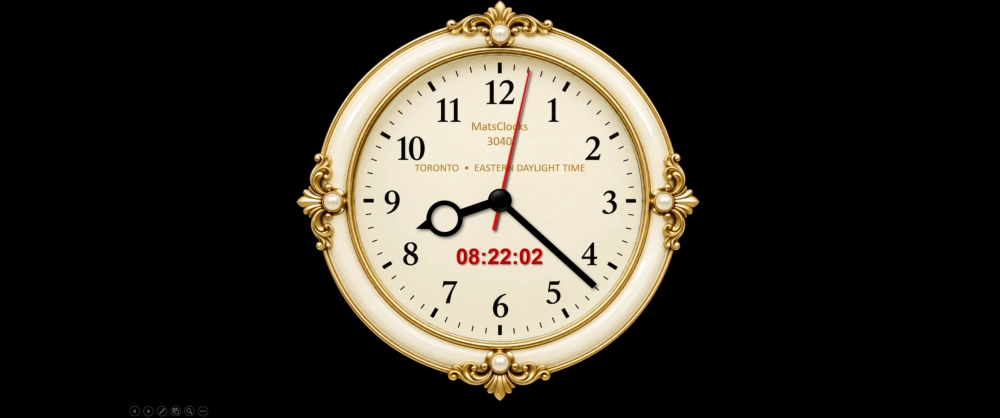
Free Download MatsClocks-3040 Time in Toronto Canada
MatsClocks 3040 Time in Toronto Canada Clock can display live time in Toronto Canada, on your PowerPoint Presentation Slide in both analog clock and the digital timer next to it. Irrespective where you live in the world MatsClocks 3040 will always show you Live Time in Toronto Canada now. The PowerPoint presentation clock even caters for daylight saving time automatically. Just download and run this PPTM Macro Enabled PowerPoint slide on your PC or Laptop. Go to the Presentation mode and the clock automatically starts running.
Note: All MatsClocks are in Zip files which can be opened using WinZip or any common file compression program. If you do not have PowerPoint software installed in your device then please get Microsoft_Office Software with essential Office software apps like Word, PowerPoint, Excel, and One Note etc. If you already have Microsoft Office installed then please update it today to get all the latest features.
Time in Toronto Canada: History, Time Zones, EDT, EST and MatsClocks 3040
Time may seem like one of the simplest things in everyday life. We look at a clock, check our phone, or glance at the corner of a computer screen and immediately know what hour it is. But when people, businesses, classrooms and organizations are working across different countries and time zones, knowing the correct local time becomes much more important.
One city where accurate time matters enormously is Toronto, Canada.
Time in Toronto Canada follows the Eastern Time Zone. Depending on the season, Toronto observes either Eastern Standard Time (EST) or Eastern Daylight Time (EDT). EST is five hours behind Coordinated Universal Time (UTC−5), while EDT is four hours behind UTC (UTC−4). Toronto changes between these two time standards according to Canada's daylight-saving rules.
For someone sitting in another country, however, keeping track of Toronto time mentally can become inconvenient. This is particularly true during online meetings, international business presentations, university classes, webinars, travel planning and events involving people in North America.
That is where a dedicated PowerPoint clock such as MatsClocks 3040 can become a practical presentation tool.
Why Is Time in Toronto Canada So Important?
Toronto is one of Canada's largest and most internationally connected cities. It is an important center for business, finance, education, technology, media, transportation and culture.
That international role means people outside Canada frequently need to know what time it is in Toronto.
Imagine a company employee in India preparing for an online meeting with colleagues in Toronto. A university professor in Europe may be teaching students connected to Canada. A sales team in Asia may be arranging a presentation for a Canadian customer. A travel company may be coordinating an itinerary involving Toronto. A financial professional may need to keep an eye on the Toronto business day.
In all these situations, time is more than a number on a clock.
It becomes part of the communication.
A simple visual display of Time in Toronto Canada can immediately answer a question that might otherwise require someone to open a browser, search for Toronto time, check a world-clock website or manually calculate the difference between time zones.
That is especially useful when the Toronto time needs to remain visible throughout a presentation.
Time in Toronto Uses the Eastern Time Zone (EST)
Toronto is located in Ontario and follows the Eastern Time Zone.e.
There are two principal time designations used during the year:
- Eastern Standard Time (EST): UTC−5
- Eastern Daylight Time (EDT): UTC−4
During standard time in Toronto Canada, it is five hours behind UTC. During daylight saving time, clocks move forward by one hour and Toronto becomes four hours behind UTC.
This seasonal change is one reason that simply memorizing a fixed difference between Toronto and another city can sometimes cause confusion.
For example, someone working with Toronto from another country might calculate the time difference correctly during one part of the year but be one hour out during another part of the year.
A clock that automatically follows Toronto's time-zone rules removes much of that mental calculation.
What Is Eastern Standard Time (EST)?
Eastern Standard Time, commonly abbreviated as EST, is the standard-time designation used for Time in Toronto Canada, during the winter portion of the year.
EST corresponds to UTC−5. In practical terms, when Toronto is observing EST, local Toronto time is five hours behind Coordinated Universal Time. Canada's National Research Council identifies the Eastern time-zone standard as UTC−5, with daylight time being UTC−4 where daylight saving is observed.
EST is sometimes the time people have in mind when they casually refer to "Toronto time," but it is important to remember that Time in Toronto Canada does not remain on EST throughout the entire year.
The clock changes to daylight time during the warmer months.
That distinction matters for anyone scheduling events months in advance.
What Is Eastern Daylight Time (EDT)?
Eastern Daylight Time, or EDT, is used when daylight saving time is in effect.
During EDT, Toronto operates at UTC−4, meaning the local clock is one hour ahead of its EST position relative to UTC.
The purpose of daylight saving time is connected to making greater use of available daylight during the lighter months of the year.
In Ontario, clocks generally move forward by one hour in March and return to standard time in November under Canada's current North American daylight-saving schedule. The National Research Council states that, beginning in 2007, the standard Canadian schedule for jurisdictions following these rules is the second Sunday in March for moving clocks forward and the first Sunday in November for moving them back.
For 2026, Time in Toronto Canada, the daylight-saving change began on March 8 and is scheduled to end on November 1.
Why Does Canada Follow EST and EDT?
Canada is an enormous country stretching across multiple geographical regions. Because the sun does not rise and set at the same time across such a large area, the country uses multiple time zones.
The Canadian government recognizes several standard time zones, including Eastern, Central, Mountain and Pacific, along with additional zones. The Eastern zone uses UTC−5 as standard time and UTC−4 during daylight time where DST is observed.
Daylight Saving Time in Toronto Canada is generally established through provincial and territorial legislation, with some local exceptions. Ontario follows the Eastern Standard/Eastern Daylight pattern used by Toronto.
For Toronto, the seasonal change means that the city can make better use of daylight during the summer portion of the year while maintaining standard time during the winter.
It also means that anyone trying to coordinate activities with Toronto from overseas needs to understand the difference between EST and EDT.
A Brief History of Time in Toronto Canada
The history of Time in Toronto Canada is closely connected with the development of standardized time zones in North America.
Before modern time zones became firmly established, local communities could determine their time according to the position of the sun. This worked reasonably well when travel and communication were relatively slow.
But the arrival and expansion of railways created a practical problem.
A train travelling between cities could encounter different local times along its route. Railway schedules therefore needed a more organized approach to timekeeping.
Time in Toronto Canada eventually became part of the standardized Eastern time system.
Historical records show that Toronto's time-zone history includes periods when standard time was followed as well as periods when daylight saving time was introduced. For example, Toronto changed from EST to EDT in 1918, demonstrating that daylight-saving practices have a long history in the city.
The exact dates for daylight-saving changes have not always remained the same. Historical records show different start and end dates in different periods, reflecting changes in legislation and timekeeping practices over the decades.
The modern system is much more predictable. Since 2007, jurisdictions following the North American daylight-saving schedule have generally moved clocks forward on the second Sunday in March and backward on the first Sunday in November.
Time in Toronto Canada and the Modern World
Today, Toronto time is important far beyond the city's geographical boundaries.
The internet has effectively turned Toronto into a neighbor of cities thousands of kilometers away.
A software developer in Bengaluru can work with a Toronto client. A marketing specialist in London can attend a Toronto meeting. A teacher in another country can deliver a live presentation to Canadian students. A company in Asia can schedule customer-support activities around Toronto business hours.
This creates a simple but important question:
What is the Toronto Time Right now?
Searching for the answer is easy enough. But repeatedly checking a website during a presentation is not always convenient.
This is where an on-screen PowerPoint clock has an advantage.
Meet MatsClocks 3040 — Time in Toronto Canada on Your PowerPoint Screen
MatsClocks 3040 is designed for people who want Time in Toronto Canada displayed directly within a PowerPoint presentation.
Instead of opening another browser window or interrupting a presentation to check a world clock, a dedicated Toronto time display can become part of the presentation environment itself.
This can be particularly useful when the presentation is running on a large screen, classroom projector, conference-room display or meeting-room monitor.
The MatsClocks 3040 becomes a quiet visual reference.
People can look at it whenever they need to know Toronto time without interrupting the speaker.
Who Should Download MatsClocks 3040?
MatsClocks 3040 can be useful for a wide range of people.
1. International Businesses
Companies working with customers, employees or partners in Toronto can use a visible Toronto clock during meetings and presentations.
Instead of repeatedly asking, "What time is it in Toronto?", participants can simply look at the MatsClocks 3040.
2. Teachers and Professors
Educational institutions increasingly connect students and teachers across borders.
A Toronto time clock can be useful during online classes, international lectures, academic presentations and collaborative learning sessions.
3. Students
Students working with Canadian universities, organizations or international project teams may need to coordinate activities around Toronto time.
A PowerPoint clock like MatsClocks 3040 provides an easy visual reminder.
4. Online Meeting Hosts
If you regularly conduct meetings involving Toronto-based participants, displaying Toronto time can make scheduling easier.
It can also help participants understand whether a meeting is taking place during Toronto's morning, afternoon or evening.
5. Presenters and Speakers
Conference speakers can use a live clock as part of their presentation environment.
MatsClocks 3040 can be especially useful for presentations with strict schedules or events involving participants from several countries.
6. Travel Professionals
Travel agencies, tour operators and travel planners dealing with Toronto can use a Toronto time PowerPoint clock like MatsClocks 3040 when explaining schedules and itineraries.
7. Remote Workers
Remote workers often collaborate with colleagues in different countries.
Having Toronto time visible during work sessions can reduce the need for repeated time-zone calculations.
8. Anyone Fascinated by World Time
You don't necessarily have to work with a Toronto-based organization to find a Toronto time clock useful.
If you are interested in Canada, international time zones, geography or world clocks, MatsClocks 3040 can make an attractive addition to your PowerPoint collection.
Benefits of MatsClocks 3040
The biggest advantage of a dedicated Toronto PowerPoint clock is convenience.
Instead of repeatedly searching the web for Toronto time, you can have the clock available as part of your presentation.
No Mental Time-Zone Calculations
You do not need to repeatedly calculate the difference between your local time and Toronto time.
The Toronto clock provides a direct visual reference.
Useful for International Presentations
When several countries are represented in a meeting, a PowerPoint clock showing time in Toronto Canada like MatsCocks 3040 can provide a clear reference for Canadian participants.
Easy Visual Communication
Sometimes the simplest information is the most useful.
A large, visible clock can communicate the time without interrupting the presenter or requiring anyone to ask a question.
Helps With Scheduling
Knowing the local Toronto time can help teams avoid accidentally scheduling calls during inconvenient hours.
Ideal for Large Screens
A PowerPoint clock can be particularly useful when projected onto a classroom screen, conference display, television or large presentation monitor.
Keeps Time Visible
Rather than switching between applications, the clock can remain part of the presentation environment. The best part is that MatsClocks 3040 caters for daylight saving time changes automatically, so that you don't have to worry.
Useful Across Different Locations
One of the most useful concepts behind a destination-time clock is that the location shown is Toronto, not necessarily the location where the computer or presenter happens to be.
That makes a dedicated Toronto clock particularly relevant for international users.
EST and EDT: Why Automatic Time Changes Matter
One of the most important considerations when displaying Toronto time is daylight saving.
Toronto does not use UTC−5 throughout the year.
During daylight saving time, Toronto uses EDT at UTC−4. During standard time, it returns to EST at UTC−5.
This is exactly why an automated destination clock is more convenient than manually creating a static time display.
A static PowerPoint slide can show a time, but the displayed value eventually becomes outdated.
A live clock showing time in Toronto Canada is different.
It is intended to keep updating as time passes, making it much more suitable for an ongoing presentation, classroom, meeting or display.
Why a Time in Toronto Canada PowerPoint Clock is Better Than a Browser Tab
A browser-based world clock is useful, but it may not always be ideal during a presentation.
You may have to:
- Open a browser.
- Search for Toronto time.
- Switch away from PowerPoint.
- Find the correct page.
- Return to the presentation.
That can interrupt the flow of a presentation.
A PowerPoint clock takes a different approach.
The time becomes part of the presentation itself.
For someone presenting regularly, MatsClocks 3040 can make a difference that can make the experience much smoother.
The Importance of Accurate Time in Business
Time has always been closely connected with business.
Meetings begin at particular times. Financial markets operate according to scheduled hours. Flights depart according to timetables. Classes begin at specific times. Webinars have published schedules. Customer-support teams work shifts.
When international participants are involved, local time becomes even more important.
Toronto is part of a major North American time zone, and its time is closely associated with the schedules of many businesses and organizations.
That makes Time in Toronto Canada a useful reference for international communication.
Toronto Time and New York Time
Toronto time and New York Time share the same Eastern Time schedule. During daylight saving time, both observe EDT, and during standard time, both observe EST.
This is useful when coordinating activities between the two major cities.
However, knowing that Toronto and New York share a time zone does not eliminate the need for a visible Toronto time clock. A presentation may specifically concern time in Toronto Canada, or Ontario-based customers .
A destination-specific clock makes that connection immediately obvious.
A Small MatsClock 3040 With a Big Purpose
There is something surprisingly powerful about seeing the correct Toronto time displayed on a presentation screen using MatsClocks 3040.
It creates awareness.
It helps people coordinate.
It reduces questions.
It makes international presentations feel more organized.
And perhaps most importantly, it allows people to concentrate on what they are doing rather than repeatedly calculating time differences.
That is the practical appeal of MatsClocks 3040.
Instead of thinking about the mathematics behind UTC, EST and EDT, you can simply look at the Toronto clock.
Make Time in Toronto Canada Part of Your Presentation
Toronto is a city that operates on a carefully defined time system shaped by geography, history, transportation, legislation and modern international communication.
Today, Toronto follows Eastern Time, using EST (UTC−5) during standard time and EDT (UTC−4) during daylight saving time. Canada's current daylight-saving framework generally moves clocks forward in March and back in November in jurisdictions following the standard schedule.
For someone who only occasionally needs Toronto time, checking a clock online may be enough.
But for teachers, businesses, presenters, students, remote workers and international teams that frequently work with Toronto, having a dedicated Toronto clock directly in PowerPoint can be much more convenient.
MatsClocks 3040 brings Time in Toronto Canada directly into your PowerPoint presentation, giving you a simple visual way to keep Toronto time in view while you work, teach, meet or present.
If Toronto is part of your professional or educational world, why keep searching for the time when you can keep it visible?
Download MatsClocks 3040 and make Time in Toronto Canada a permanent, useful part of your PowerPoint presentation.
Free Download MatsClocks-3040 Toronto Time Clock
Note:
If you do not have PowerPoint software installed in your device then
please get
Microsoft_Office Software.