 MatsClocks
PowerPoint Presentation Clocks
⏰ MatsClocks Live Time Clock
Display Live Time Clock in Your PowerPoint Presentations
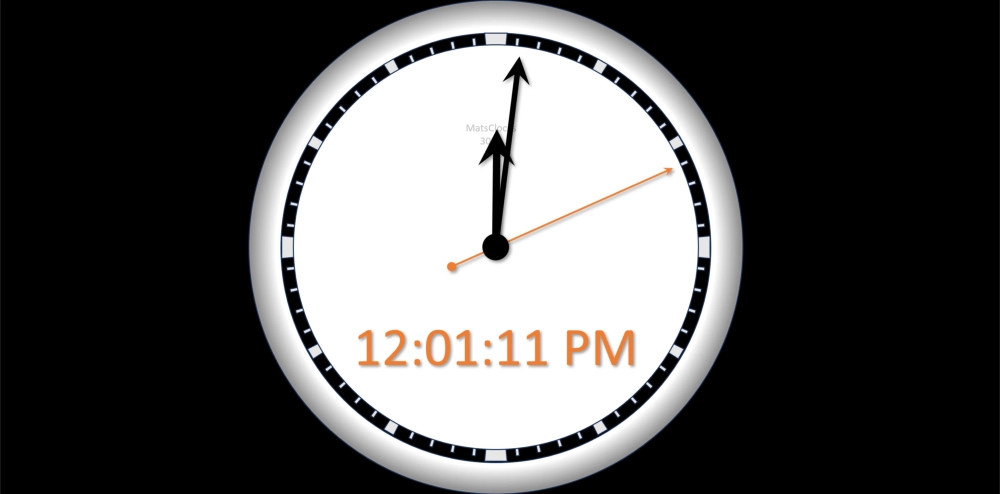
MatsClocks 3028 Time Clock can display live time on your PowerPoint Presentation Slide in both analog clock and the digital timer next to it. Just download and run this PPTM Macro Enabled PowerPoint slide on your PC or Laptop. It will start showing live time with hours, minutes and seconds needles as well as a digital time next to it. This is the local time in your PC or Laptop.
All MatsClocks are in Zip files which can be opened using WinZip or any common file compression program. If you do not have PowerPoint software installed in your device then please get Microsoft_Office Software with essential Office software apps like Word, PowerPoint, Excel, and One Note etc. If you already have Microsoft Office installed then please update it today to get all the latest features.
Introduction: Why Time Matters in Presentations
At MatsClocks, we believe that time is the invisible backbone of every presentation. Whether you’re leading a corporate meeting, teaching a classroom, or hosting a live webinar, managing time effectively is the difference between a polished, professional experience and a rushed, chaotic one.
PowerPoint live clock timers are more than just digital stopwatches. They are visual cues that help presenters stay focused, audiences stay engaged, and events run smoothly. With our tools, you can add countdowns, real‑time clocks, and animated timers directly into your slides — no external apps required.
2. What Are PowerPoint Live Clock Timers?
The time displayed in a MatsClock PowerPoint live clock is a dynamic element embedded into your slides that displays either:
- A real Digital‑time Live clock
- A real Analog‑time Live clock
- A real Digital Local time Live clock
- A real Digital GMT / UTC Live time clock
- A Countdown time Clock (e.g., 10 minutes until Q&A).
- A Stopwatch timer Clock (tracking elapsed time).
Unlike static images, these timers display live time during your presentation, ensuring that both you and your audience know exactly how much time is left.
3. Benefits of Using Live Time Clocks
- ⏱ Professionalism: Keep meetings structured and avoid overruns.
- 🎓 Education: Perfect for quizzes, timed assignments, and classroom activities.
- 🎤 Events: Manage breaks, transitions, and countdowns to keynote sessions.
- 💻 Webinars: Maintain pacing and keep virtual audiences attentive.
- 🧘 Productivity: Use timers for focus sessions, workshops, or personal practice.
4. Tutorials: How to Add Timers in PowerPoint
You can Download the MatsClocks which are beautiful digital clocks and analog clocks combined to show live time, either local time or GMT time.
There are a few steps to complete before the clock you download starts running which you can read below:
- How to Make the Downloaded MatsClocks Live Time Clock Work
MatsClocks won't work unless you do these two steps. The default behavior of Microsoft PowerPoint is to block any PowerPoint file downloaded from the Internet. So you need to Unblock the PowerPoint file first. MatsClocks has a digital time display, and an analog display with hour, minute, and seconds needles displaying the time based on Macro Codes. So as the second step, you need to allow the Macro codes to run on your Computer as explained below.
- How to Unblock PowerPoint File
The first step is to open File Explorer and navigate to where you have downloaded the MatsClocks PowerPoint File, then "Right Click" on it and select "Properties". On the open dialog box put a "Check Mark", on the "Unblock" option.
- How to Enable Macro in Your MatsClocks PowerPoint Presentation Slides
The second step is to Enable Macro in MatsClocks PowerPoint to make the Digital and Analog Clock Display. To do this, on the PowerPoint top left, Click on "File" then Click on "Options", which will open the PowerPoint Options Dialog Box. In this Click on the "Trust Center" and then Click "_Trust Center Settings.." In the dialog box Click on the "Macro Settings" and Select two things. The first is to select "Enable All Macros" and the next is to put a "Check mark" on the "Trust access to VBA project object model", and Click "OK".
Now Move Your Mouse Cursor from Right to Left or top to bottom over the matsclocks after whilst your in the full screen presentation mode, and the Clock will start running displaying the live time in your PC or Laptop.
If you have Downloaded a GMT MatsClock, then the time shown will be GMT and not Local time.
5. Use Cases & Inspiration
Business Meetings
Imagine presenting quarterly results with a visible 15‑minute countdown. Everyone knows the time limit, discussions stay focused, and you finish on schedule.
Education
Teachers can run timed quizzes with a live countdown on screen. Students feel the excitement, and lessons stay interactive.
Events & Conferences
Event organizers can display countdowns to keynote speeches or breaks, ensuring smooth transitions.
Productivity & Workshops
Facilitators can use timers for brainstorming sessions, giving participants clear boundaries and boosting creativity.
Finally, you can download any MatsClocks
Free PowerPoint clock timer for free and use it free anywhere.
MatsClocks can even be distributed freely without any modification and
without charging any type of remuneration of any sort. MatsClocks are
intended to be Free in every sense, for downloading, using and
distributing. If you need a custom PowerPoint Live Time Clock, then
contact me and I will provide you at a small price, because it takes
hell of a lot of time to design each MatsClocks.
If you do not have PowerPoint software installed in your device then
please get
Microsoft_Office Software with essential Office
software apps like Word, PowerPoint, Excel, and One Note etc. If you
already have Microsoft Office installed then please update it today to get
all the latest features.