 MatsClocks
PowerPoint Presentation Clocks
⏰ Japan Standard Time Clock
Display the Local Time in Japan Now on MatsClocks 3033
What if you are in India and you want to showcase the current Local Time
in Tokyo Japan, sitting anywhere in the world using just a
PowerPoint Presentation? Is it possible? Yes you can. It is possible to display
the local time of Tokyo or anywhere in Japan using this PowerPoint
Presentation that has a Clock embedded with a digital time display as well
as using hours, minutes, and seconds needles. Isn't it amazing?
Free Download MatsClocks 3033 Japan Standard Time
PowerPoint Presentation Clock.
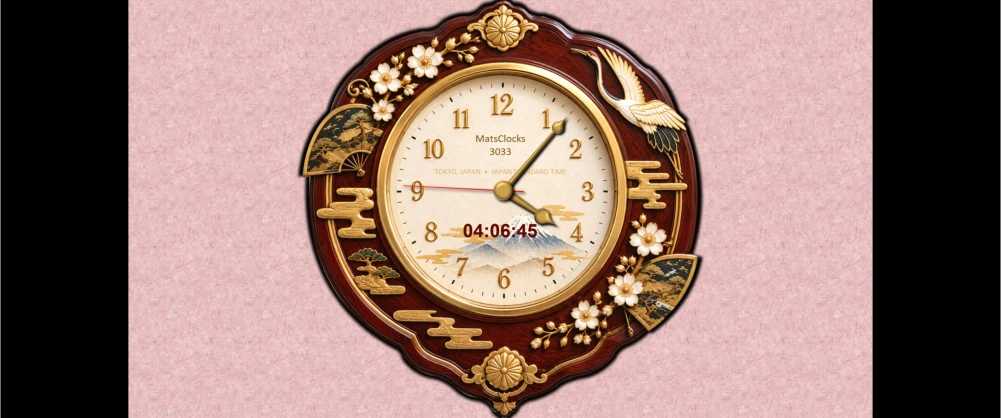
Free Download MatsClocks-3033
Japan Standard Time Clock
Next Clock >>
All MatsClocks are in Zip files which can be opened using WinZip or any common file compression program. If you do not have PowerPoint software installed in your device then please get Microsoft_Office Software with essential Office software apps like Word, PowerPoint, Excel, and One Note etc. If you already have Microsoft Office installed then please update it today to get all the latest features.
Japan Standard Time (JST): Understanding Japan’s Time Zone and the Power of a Live Japan Clock in PowerPoint
Time is one of the simplest things in everyday life, yet it becomes remarkably important when people, businesses, classrooms and organizations operate across international borders. Japan is a particularly interesting example because the entire country follows one principal standard time: Japan Standard Time (JST).
Whether you are communicating with someone in Tokyo, conducting an international business meeting, teaching a class about Japan, presenting Japanese history and culture, or simply wanting your audience to know the current time in Japan, a live Japan local time clock can be an exceptionally useful addition to a PowerPoint presentation.
What Is Japan Standard Time?
Japan Standard Time, commonly abbreviated as JST, is Japan's standard time and is UTC+9. In other words, Japan's clocks are nine hours ahead of Coordinated Universal Time (UTC). UTC provides the international reference against which local time-zone offsets are expressed.
The time zone is commonly represented by the IANA time-zone identifier Asia/Tokyo.
JST or Japan Standard Time applies throughout Japan, including major cities such as:
- Tokyo
- Osaka
- Kyoto
- Yokohama
- Nagoya
- Sapporo
- Kobe
- Hiroshima
- Fukuoka
- Naha
This makes Japan relatively straightforward from a time-zone perspective: you generally don't need to calculate different local times for different Japanese cities.
Japan Standard Time JST and UTC: The Simple Relationship
The easiest way to understand JST is:
JST = UTC + 9 hours
So, if UTC is:
12:00 UTC
the corresponding Japanese time is:
21:00 JST
Unlike UTC itself, local time zones can have offsets from UTC. NIST explains that local time is expressed using such offsets, while UTC remains the international reference time scale. (NIST) or National Institute of Standards and Technology
This relationship is particularly useful when scheduling international meetings.
For example, a company in London, New York, Mumbai or Sydney can calculate the appropriate Japanese meeting time by converting its own local time to JST.
Does Japan Use Daylight Saving Time?
One of the most useful things to remember about Japan is that Japan Standard Time currently does not observe daylight saving time.
That means Japan's clocks normally remain on UTC+9 throughout the year.
This makes Japan particularly convenient for international scheduling. Countries that use daylight saving time can change their clocks during part of the year, meaning the difference between their local time and Japan can change. Japan itself does not make that seasonal clock adjustment.
For a PowerPoint clock, this is important because a properly programmed Japan Standard Time clock can simply use the Asia/Tokyo time zone and continuously display the appropriate current Japanese time.
Why Is Japan Standard Time Important?
Japan is one of the world's major economic, technological, scientific and cultural centers. Its time zone therefore matters far beyond Japan itself.
Tokyo is a major international business center. Japanese companies operate globally, while organizations around the world communicate with Japanese customers, suppliers, universities, government agencies and business partners.
JST or Japan Standard Time is also important for:
International business — Meetings with Japanese organizations need to be scheduled according to Japanese local time.
Education — Teachers can demonstrate international time zones and geography.
Travel — Travelers need to know Japanese local time when planning flights, hotel check-ins and activities.
Finance — International financial markets operate according to different local schedules.
Technology — Software systems, servers and applications need accurate time-zone handling.
Media and broadcasting — Japanese television, online events and international broadcasts frequently use Japanese local time.
Sports — International audiences need to understand the Japanese local starting time of events.
Japan Standard Time and the International Date Line
Japan's position in the world makes its time particularly interesting.
Japan lies in East Asia, relatively close to the International Date Line in the Pacific. Because Japan operates at UTC+9, its calendar date can differ substantially from locations in North America and Europe.
This becomes especially noticeable when people arrange international meetings late at night or early in the morning.
A meeting that takes place on Monday in Japan may still be Sunday in parts of North America.
That is why displaying the date as well as the time can be extremely useful in an international presentation.
A Live Japan Standard Time Clock Inside PowerPoint Presentation
Imagine giving a PowerPoint presentation to an audience and having a beautifully designed clock on the slide displaying:
Japan — Tokyo
with a digital clock showing the current Japan Standard Time and an analog clock whose hour, minute and second hands continuously move.
Instead of telling your audience, "The current time in Japan is..." you can allow the PowerPoint presentation itself to display the time.
This creates a much more professional and informative PowerPoint presentation.
A live PowerPoint Japan Standard Time clock can be designed to display:
- Current Japanese time
- Hours
- Minutes
- Seconds
- AM/PM or 24-hour time
- Current date
- "Japan Standard Time"
- "JST"
- "UTC+9"
- Tokyo or Japan
- An analog clock face
- Moving hour, minute and second hands
The clock can be placed unobtrusively in a corner of the presentation or made into a prominent visual element.
Free Download MatsClocks 3033 Japan Standard Time PowerPoint Presentation Clock.
Digital and Analog Japan Standard Time Clocks
A particularly effective design is to combine digital and analog clocks.
The digital clock provides precision.
For example:
20:43:27
The analog clock provides immediate visual recognition.
The moving second hand makes the clock feel alive, while the hour and minute hands provide the traditional appearance of a real wall clock.
Together, the two formats provide both accuracy and visual appeal.
For presentations, this combination can be considerably more engaging than simply displaying a static text label such as "Japan: 8:43 PM."
Why Put a Japan Standard Time Clock on a PowerPoint Slide?
A live clock can serve several purposes simultaneously.
1. It Shows Real-Time Information
The audience can immediately see the current Japan Standard Time.
2. It Helps International Audiences
People watching from another country can instantly understand the time difference.
3. It Makes Presentations More Dynamic
A moving clock subtly communicates that the presentation is connected to real-world time.
4. It Helps With International Meetings
A presentation being delivered to Japanese participants can show their local time throughout the meeting.
5. Japan Standard Time Is Excellent for Teaching
Teachers can use the Japan Standard Time clock to explain:
- Time zones
- UTC
- Longitude
- International date differences
- Day and night
- World geography
- Global communication
6. It Provides a Professional Touch
A carefully designed clock can make an otherwise ordinary PowerPoint slide look like a sophisticated information display.
Japan Standard Time Clock for Business PowerPoint Presentations
Consider an international company conducting a PowerPoint presentation for employees in Japan.
The presenter is located outside Japan, but the PowerPoint Presentation slide contains a live Japan clock.
The audience doesn't have to mentally calculate the time difference.
They can simply look at the slide.
This is especially useful for:
- International conferences
- Corporate meetings
- Sales PowerPoint presentations
- Webinars
- Training programs
- Project meetings
- Customer demonstrations
- Global team meetings
A company could even display several clocks simultaneously:
New York | London | Mumbai | Tokyo | Sydney
This immediately communicates the global nature of the organization.
Japan Standard Time Clock for Classrooms
A live Japan Standard Time clock can also turn an ordinary geography lesson into an interactive experience.
A teacher might display a world map with clocks for several cities.
Students can observe that when it is daytime in Japan, it may be nighttime in another part of the world.
The teacher can then explain how Earth's rotation creates differences in local time.
A PowerPoint Presentation clock therefore becomes more than decoration. It becomes a teaching instrument.
Japan Standard Time Clock for Travel PowerPoint Presentations
Travel PowerPoint presentations can benefit enormously from a live Japan Standard Time clock.
Suppose a presentation is about visiting Japan.
A slide about Tokyo could include:
TOKYO — JAPAN
Japan Standard Time
UTC+9
alongside a live analog clock.
The audience immediately gets a visual sense of Japanese local time.
This can be particularly useful when explaining international flights, jet lag, hotel check-in times and travel schedules.
The Technology Behind a Live PowerPoint Presentation Clock
A static PowerPoint Presentation clock is simply an image.
A live PowerPoint clock is different.
The presentation needs some mechanism to obtain or calculate the current time and update the displayed clock.
One approach is to use VBA (Visual Basic for Applications)
in a PowerPoint Presentation .pptm
The VBA program can:
- Obtain the computer's current time.
- Determine the required time-zone offset.
- Convert the local time to Japanese time.
- Update the digital clock.
- Calculate the position of the second hand.
- Calculate the position of the minute hand.
- Calculate the position of the hour hand.
- Refresh the display continuously.
The result can be a clock that behaves much more like a physical clock than a conventional PowerPoint graphic.
Creating a Smooth Analog Japan Standard Time Clock
The analog portion of a Japan Standard Time clock requires a little more mathematics.
A clock face contains 360 degrees.
There are 60 seconds in a minute, so the second hand moves approximately:
6 degrees per second
The minute hand similarly moves approximately:
6 degrees per minute
The hour hand is slightly different.
It moves continuously as the minutes pass rather than jumping from one hour marker to the next.
For example, at 3:30, the hour hand should be halfway between 3 and 4.
A sophisticated PowerPoint clock therefore calculates the hour-hand position using both the hour and minute values.
This creates a much more natural-looking clock.
Why Accurate Seconds Matter
A PowerPoint Presentation clock that skips seconds can be distracting.
For example, if the display changes:
10:25:08 → 10:25:10
the audience may notice that the clock has missed a second.
For a professional presentation, the clock should preferably synchronize itself with the computer's actual time rather than simply counting seconds internally.
This distinction is important.
A program that merely says "add one second every second" can gradually drift because computer execution and timer intervals are not perfectly precise.
A better approach is to repeatedly obtain the actual current time and calculate the clock hands from that time.
The clock then corrects itself automatically.
12-Hour or 24-Hour Japan Standard Time Clock?
A PowerPoint Japan clock can use either format.
12-hour format
8:43 PM
This is familiar to many audiences and is easy to read.
24-hour format
20:43
This is particularly useful for:
- Business PowerPoint presentations
- Military PowerPoint presentations
- Transportation
- International meetings
- Technical PowerPoint presentations
- Aviation
- Shipping
For an international PowerPoint presentation, the 24-hour format can often eliminate ambiguity.
Displaying the Japanese Date
A sophisticated PowerPoint clock can also display the date.
For example:
Monday, September 7, 2026
Tokyo, Japan — JST (UTC+9)
This is particularly valuable when the presenter and audience are in different countries and potentially different calendar dates.
Time alone does not always tell the whole story.
The date + time + location combination provides much better international context.
Designing a Beautiful Japan Standard Time PowerPoint Presentation Clock
The visual design can be as important as the programming.
A Japanese-themed clock could incorporate subtle elements inspired by Japan without becoming visually cluttered.
For example, the slide could feature:
- A clean circular clock
- Elegant Japanese-inspired typography
- A subtle red accent
- A white clock face
- Minimal hour markers
- A small Japanese flag
- Tokyo skyline imagery
- Mount Fuji imagery
- Traditional Japanese patterns
- A dark blue or charcoal background
- A small "JST" or "Japan Standard Time" label as seen in MatsClocks 3033 would be appropriate
For a corporate PowerPoint presentation, however, restraint is usually better than excessive decoration.
The Japan Standard Time clock should remain easy to read from the back of a conference room.
A Japan Standard Time Clock Can Become Part of the PowerPoint Presentation Theme
The Japan Standard Time clock does not necessarily have to appear on only one slide.
It can be incorporated into the overall presentation design.
For example:
Top-right corner: small digital Japan Standard Time clock
Bottom-right corner: date
Bottom-left corner: presentation title
Main area: presentation content
This creates a consistent visual identity.
Alternatively, a dedicated opening slide could feature a large analog Japan clock with Tokyo in the background.
Japan Standard Time in the Modern Connected World
The importance of JST or Japan Standard Time extends far beyond clocks.
Modern communication has made geographical distance less important, but time-zone differences remain.
A person can send an email from India to Tokyo in seconds.
A company in America can hold a video conference with Japan instantly.
A student in Europe can attend an online lecture hosted in Japan.
A developer in Japan can collaborate with a team in Australia.
Yet all of these activities still require one fundamental question:
"What time is it there?"
That is why time-zone clocks remain surprisingly valuable in the digital age.
Japan Standard Time JST and Global Coordination
International organizations often work across multiple time zones.
Imagine a team with members in:
- San Francisco
- London
- Mumbai
- Tokyo
- Singapore
A single local clock is insufficient.
A world-clock PowerPoint slide can show all five locations simultaneously.
The Japanese clock becomes the reference for the Tokyo team.
This is particularly useful for global project management because employees can quickly identify reasonable meeting hours and avoid accidentally scheduling meetings at inconvenient times.
Japan's Timekeeping and Modern Technology
Accurate timekeeping is fundamental to modern technology.
Computers, telecommunications networks, financial systems, transportation systems, satellites and Internet services all depend on reliable time.
UTC provides the international reference framework, while local systems convert UTC into appropriate local time. NIST notes that UTC is not itself changed for daylight-saving transitions; local time zones may change their relationship to UTC when DST is observed. (NIST)
For Japan, the absence of a current seasonal clock change makes JST relatively straightforward to handle.
Japan Standard Time JST Is More Than Just a Number
It is tempting to think of Japan Standard Time simply as:
UTC + 9
But a time zone represents much more.
It connects geography with everyday life.
It determines when offices open, when trains operate, when television programs begin, when schools start, when businesses conduct meetings and when people go to sleep.
It is an invisible framework that organizes modern society.
A PowerPoint clock makes this invisible framework visible.
Using a Japan Standard Time Clock During a PowerPoint Presentation
There are many situations in which displaying JST makes sense.
Business meeting
Show the Japanese local time when presenting to Japanese clients or colleagues.
Classroom
Use the clock to teach time zones and geography.
International conference
Show the current time in Tokyo alongside other international locations.
Travel PowerPoint Presentation
Display Tokyo time while discussing Japanese destinations.
Aviation PowerPoint Presentation
Demonstrate international time differences.
Maritime PowerPoint Presentation
Explain navigation and global timekeeping.
Technology PowerPoint Presentation
Demonstrate time zones, UTC and computer clocks.
Japan-focused PowerPoint presentation
Give the presentation an authentic local-time reference.
Webinar
Help international participants understand the Japanese schedule.
The Ideal Japan Standard Time PowerPoint Presentation Clock
A really good PowerPoint Presentation Japan Standard Time clock should be like MatsClocks 3033:
Accurate — It should derive its time from a reliable system clock.
Live — It should continue updating while the presentation runs.
Smooth — The second hand should not visibly jump or skip unexpectedly.
Readable — The audience should be able to see it from a distance.
Automatic — It should not require the presenter to manually change the time.
Time-zone aware — It should display Japan's actual local time rather than simply adding nine hours to an arbitrary value.
Professional — Its design should complement rather than distract from the presentation.
Reliable — It should continue functioning throughout the slideshow.
A Japan Standard Time Clock That Connects Your Audience to Japan - MatsClocks 3033
A live Japan Standard Time clock inside PowerPoint Presentation may appear to be a small feature, but it can have a surprisingly large impact.
It transforms an ordinary presentation from a collection of static slides into something connected to the real world.
The audience doesn't simply see information about Japan.
They can see Japan's current time happening live.
That makes the presentation feel more immediate, international and technologically sophisticated.
Japan Standard Time provides a simple and consistent reference - UTC+9, without a current daylight-saving adjustment - while PowerPoint provides an excellent platform for turning that information into an attractive visual experience.
Whether used in a classroom, boardroom, webinar, conference, travel presentation or international business meeting, a live Japan Standard Time clock can provide an elegant bridge between Japan and the rest of the world.
And perhaps that is the most interesting thing about a clock: it is not merely showing the passage of seconds. It is showing where we are in the world, and when combined with a global PowerPoint Presentation, helping everyone understand when "now" is somewhere else.
Free Download MatsClocks-3033
Japan Standard Time Clock
Next Clock >>
If you do not have PowerPoint software installed in your device then
please get
Microsoft_Office Software with essential Office
software apps like Word, PowerPoint, Excel, and One Note etc. If you
already have Microsoft Office installed then please update it today to get
all the latest features.