 MatsClocks
PowerPoint Presentation Clocks
⏰ Any Country Local Time Clock
Display the Local Time of Any Country Inside a PowerPoint Slide with MatsClocks
What if you are in India and you want to showcase the current Local Time of Seattle USA with even the Day Light Saving Time catered for. Is it possible to display any country's local time sitting somewhere else in the world?
The answer is YES. It is possible to display the local time of any
place sitting anywhere in the world. For example, you can show the local
time of Seattle USA in a PowerPoint Presentation Slide sitting anywhere
in the world using this PowerPoint Presentation.
Free Download MatsClocks-3032
Seattle USA Local Time Clock
Next
Clock >>
All MatsClocks are in Zip files which can be opened using WinZip or any common file compression program. If you do not have PowerPoint software installed in your device then please get Microsoft_Office Software with essential Office software apps like Word, PowerPoint, Excel, and One Note etc. If you already have Microsoft Office installed then please update it today to get all the latest features.
Local Time of Any Country Inside a PowerPoint Slide from Anywhere in the World
Imagine standing in a conference room in India and delivering a presentation to an audience in New York. Your PowerPoint slide shows a clock, but instead of showing Indian time, it displays the current local time in New York, complete with a digital clock and a traditional analog clock with moving hours, minutes and seconds hand.
Now imagine changing the destination to London, Tokyo, Sydney, Dubai, Singapore, or virtually any other location in the world. The presentation continues to run from your computer, yet the clock displays the correct local time for the selected destination.
This is the power of putting a live world clock directly inside a PowerPoint presentation.
A Clock That Knows Where in the World You Want to Be
A conventional clock displayed on a PowerPoint slide is simply a picture. It may look beautiful, but the hands don't move and the numbers don't change.
A live PowerPoint clock is completely different.
It can be designed to calculate the time for a particular location and continuously update it while the presentation is running. The computer might physically be in Mumbai, London, New York, or anywhere else, but the clock can show the local time of the destination you have selected.
For example, a presentation running in India could display:
- New York local time
- London local time
- Dubai local time
- Singapore local time
- Tokyo local time
- Sydney local time
- Los Angeles local time
The presenter doesn't have to be physically located in that country.
That makes the clock particularly useful for presentations involving international audiences, overseas offices, global operations, travel, aviation, shipping, education and business.
Digital and Analog Clocks on the Same Slide
One of the most attractive ways to implement this concept is to display two clocks together.
The first is a digital clock showing the time in large, easily readable numbers.
10:35:42 AM
Beside it, an analog clock can show the same time using traditional hour, minute and second hands.
The digital display provides precision and immediate readability, while the analog clock gives the audience an intuitive visual understanding of the passage of time.
Together, they can turn an ordinary PowerPoint slide into something that feels much more dynamic and professional.
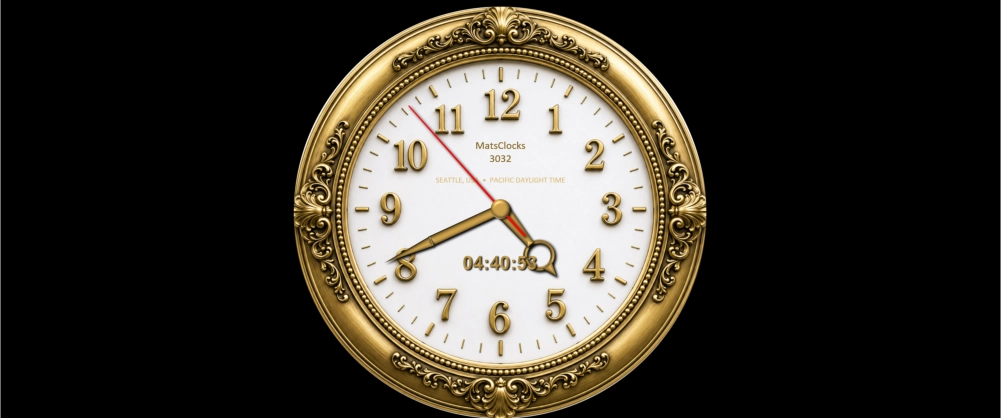
Here is an example: This clock shown below is a PowerPoint Slide with a Digital and Analog Clock that displays Local Time in Seattle, USA. Irrespective of which part of the world you run this macro enabled PowerPoint PPTM Presentation, this clock will continue to show you the local time in Seattle, USA.
The Seattle USA Local Time Clock in a PowerPoint Slide below also caters for Day Light Saving Time automatically. So you do not have to adjust anything.
Free Download MatsClocks-3032
Seattle USA Local Time Clock
The PowerPoint Presentation Can Run From Anywhere in the World
Perhaps the most important advantage is that the physical location of the presenter does not have to match the clock's location.
Suppose a lecturer in India is conducting an online presentation for students in California. The lecturer can configure the slide to show California's local time.
Likewise, a manager in Dubai could prepare a presentation showing London time for a meeting with colleagues in the United Kingdom.
The key principle is that the clock is based on the selected destination time zone, rather than simply copying the computer's displayed local time.
This distinction is extremely important.
If your computer says 6:30 PM in India, that doesn't mean your presentation must display 6:30 PM. A properly designed world-time clock like the Seattle Local Time Clock above, can convert the underlying time to the selected destination.
Daylight Saving Time Matters
International timekeeping becomes particularly interesting because many countries and regions change their clocks during the year.
For example, locations in the United States and several other countries observe daylight saving time, while many other countries do not.
A reliable world clock therefore shouldn't simply subtract a fixed number of hours from Indian time.
Instead, it should use the destination's time-zone rules, including seasonal daylight-saving changes where applicable.
This means that a presentation designed to show New York time can automatically account for the difference between Eastern Standard Time and Eastern Daylight Time.
The result is much more dependable than manually entering a UTC offset.
How a PowerPoint World Clock Works
A live clock inside PowerPoint can be built using VBA (Visual Basic for Applications) and PowerPoint shapes.
The basic system works in several stages.
First, the program obtains the current time from the computer.
Second, it determines the relevant time-zone information.
Third, it converts that time into the selected destination's local time.
Finally, it updates the PowerPoint objects displaying the time.
The digital clock can update its text once every second, while the analog clock can continuously or periodically reposition its three hands.
The hour hand moves according to the hour and minutes, the minute hand follows the minutes and seconds, and the second hand indicates the current second.
When properly programmed, the result looks like a genuine clock embedded into the presentation.
Why Put a Live Clock on a PowerPoint Slide?
There are many situations where a live clock can provide genuine value rather than simply being decorative.
International Business Meetings
Companies with offices around the world can display the local time of another office during a presentation.
A slide discussing an overseas project could show the current time in the project's location.
Online Classes and Lectures
Teachers can display the local time of their students or an international campus.
For example, a lecturer in India teaching students in America could show American local time on the presentation screen.
Travel Presentations
A travel presentation becomes more engaging when the audience can immediately see the current local time at the destination being discussed.
A presentation about Tokyo, for example, could show Tokyo local time throughout the discussion.
Aviation
Time is fundamental to aviation. Flight schedules, departure times, arrival times, UTC and destination local times all matter.
A presentation discussing an international flight could display the destination's local time alongside other timing information.
Shipping and Maritime Operations
International maritime operations frequently involve vessels, ports and organizations operating across different time zones.
A world clock can make time-zone differences much easier to understand during training and operational presentations.
Global Project Management
A project manager coordinating teams across several countries can use clocks to make time differences immediately visible.
A slide could potentially display several destination clocks simultaneously, for example, New York, London, Dubai and Singapore.
A Live Local Time Clock Can Also Make a Presentation Look More Professional
There is another benefit that is easy to overlook: visual quality.
A well-designed analog clock can become an attractive element of a PowerPoint presentation.
Instead of having a static collection of text and bullet points, the slide can contain a polished clock with moving hands and a digital display.
The movement subtly communicates that the presentation is live and connected to real time.
It can be especially effective on:
- Opening slides
- Meeting-room displays
- Conference presentations
- Training presentations
- International webinars
- Classroom presentations
- Dashboard-style slides
- Airport and aviation presentations
- Maritime presentations
- Corporate presentations
One Presentation, Many Possible Countries
The real strength of this concept is flexibility.
You don't necessarily need a different PowerPoint presentation for every country.
The same underlying clock system can be designed around a selectable location or time zone. Change the destination, and the clock changes accordingly.
For example:
India → New York → London → Paris → Dubai → Singapore → Tokyo → Sydney
The presentation itself can remain the same while the clock displays the appropriate local time.
This makes a live world clock far more useful than a simple static clock image.
More Than Just a Clock
A live digital and analog world clock inside PowerPoint is ultimately a small example of how presentations can become interactive information displays.
PowerPoint is normally thought of as a tool for presenting text, photographs, charts and diagrams. With VBA and carefully designed slide objects, however, it can also display information that changes while the presentation is running.
A clock is one of the simplest and most visually effective examples.
It combines design, programming, time-zone mathematics and real-time updating into one PowerPoint slide.
The Future of Smarter Presentations
The traditional PowerPoint slide is static: the presenter advances from one slide to another.
A live world clock introduces a different idea, a presentation that contains information that is alive and constantly changing.
The local time clock continues ticking whether the presenter is in India, America, Europe, Asia, Australia or anywhere else.
And that is the most fascinating part.
You can be anywhere in the world, while your PowerPoint slide keeps track of the local time somewhere else.
Whether you are teaching a class, conducting a global business meeting, explaining international travel, discussing aviation or simply wanting a presentation to look more sophisticated, a live digital and analog world clock inside PowerPoint can turn an ordinary slide into a useful real-time information display.
Watch the MatsClocks 3032 USA
Seattle Local Time Clock running and showing you the Local Time of
Seattle USA in a PowerPoint Presentation Slide irrespective of where in
the world you are running the presentation.
Free Download MatsClocks-3032
Seattle USA Local Time Clock
Next
Clock >>
If you do not have PowerPoint software installed in your device then
please get
Microsoft_Office Software with essential Office
software apps like Word, PowerPoint, Excel, and One Note etc. If you
already have Microsoft Office installed then please update it today to get
all the latest features.