 MatsClocks
PowerPoint Presentation Clocks
Live Clock: Accurate Time
MatsClocks 3029: Live Clock with Hours, Minutes, and
Seconds Needles
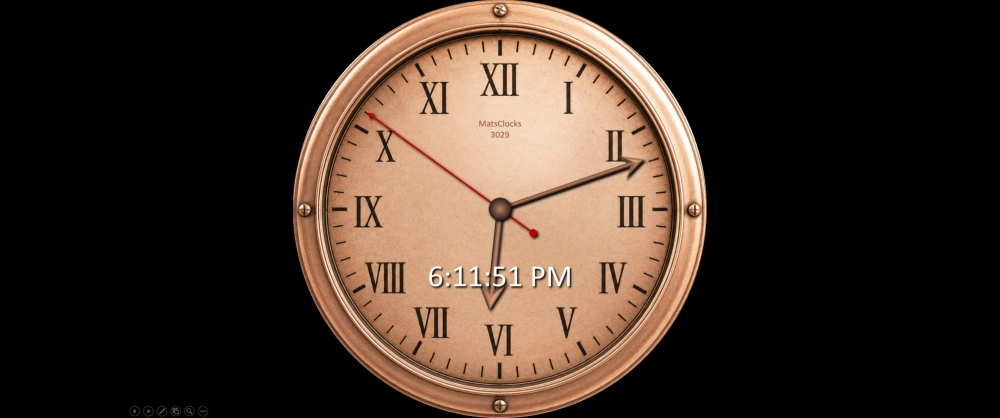
⏰ MatsClocks 3029 is a beautiful Analog Clock that displays live time on your PowerPoint Presentation Slide. MatsClocks 3029 is created in a rose gold color, and is absolutely FREE to Download and Use. You may even distribute this MatsClocks 3029 to anyone on any media without any modifications and without taking any remunerations of any kind. We would like to keep these MatsClocks PowerPoint clocks absolutely free for everyone. All MatsClocks are in Zip files which can be opened using WinZip or any common file compression program. If you do not have PowerPoint software installed in your device then please get Microsoft_Office Software with essential Office software apps like Word, PowerPoint, Excel, and One Note etc. If you already have Microsoft Office installed then please update it today to get all the latest features.
The Power of a Live Clock in PowerPoint Presentations
A PowerPoint presentation is usually filled with words, pictures, charts, graphs and numbers. Yet one of the simplest visual elements you can place on a slide is also one of the most useful: a live clock showing the current time.
Imagine walking into a classroom and seeing a presentation on the screen. In one corner of the slide, a beautifully designed analog clock is running continuously, with its hour, minute and second hands moving in real time. Beside it, a digital clock displays the exact current time. As the presentation continues, the clock keeps running without requiring the presenter to update it manually.
Why Showing Real-Time Digital and Analog Clocks Can Make Your Presentation More Effective
It may seem like a small addition, but a live clock can fundamentally change the way an audience experiences a presentation. It provides an immediate sense of time, helps presenters manage their schedules, gives students a visual understanding of elapsed time and can make meetings, lectures, training sessions and conferences more disciplined.
A live PowerPoint clock is more than decoration. It is a practical time-management instrument built directly into the presentation.
What Is a Live PowerPoint Analog Clock?
A live PowerPoint clock is an analog clock displayed on one or more PowerPoint slides that continuously shows the current time while the presentation is running.
Unlike a static image of a clock, a live clock changes automatically. If the presentation begins at 10:00 AM and continues until 10:45 AM, the clock displays 10:00, then 10:01, 10:02, and so on.
A sophisticated live clock can display time in two formats:
Digital format:
10:45:27 AM
Analog format:
A traditional clock face with moving hour, minute and second hands that
updates in real-time.
The analog clock provides instant visual recognition. Most people can glance at an analog clock and understand approximately what time it is without consciously reading numbers. The digital clock, meanwhile, provides precision.
Combining both is particularly effective because the two formats complement each other.
The analog clock provides visual elegance and familiarity, while the digital clock provides exact numerical information.
Why Put a Clock on a PowerPoint Slide?
At first, someone might ask: Why put a clock on a presentation slide when everyone already has a clock on their phone, computer or smartwatch?
The answer is surprisingly simple.
When people are watching a presentation, their attention is focused on the large screen. Looking at a phone to check the time can be distracting. It can also give the impression that the person is checking messages or losing interest in the presentation.
A clock integrated into the presentation eliminates that problem.
The audience can simply glance at the corner of the screen.
The presenter benefits as well. Instead of repeatedly checking a wristwatch, phone or wall clock, the presenter has the time immediately available.
This makes the clock a shared time reference for everyone in the room.
A Live Clock Creates Time Awareness
One of the biggest advantages of a live clock is that it creates a subtle awareness of passing time.
During a presentation, people can easily become absorbed in the subject. Ten minutes can feel like five minutes. Conversely, during a long technical explanation, five minutes can feel like fifteen.
A visible clock provides a continuous reminder that time is moving.
The audience does not necessarily need to consciously look at it. Its presence creates a background awareness of time.
This is particularly valuable in:
- Lectures
- Classrooms
- Corporate meetings
- Board meetings
- Training sessions
- Seminars
- Conferences
- Workshops
- Webinars
- Examinations
- Demonstrations
- Interviews
- Public speaking events
The Analog Clock Has a Special Visual Appeal
A digital clock is extremely practical, but an analog clock brings something different to the presentation.
The moving hands of an analog clock provide a sense of continuous movement.
An attractive analog clock can also make a PowerPoint slide look more sophisticated.
For example, a presentation about history could use a traditional clock face. A business presentation might use a minimalist modern clock. An engineering lecture could use a technical-looking clock. A school presentation could use a colorful educational clock.
The clock becomes both a functional instrument and a visual element.
There is also an important psychological advantage.
People have been looking at clock faces for generations. The circular clock face with twelve numbers and moving hands is immediately recognizable.
You don't have to explain how to use it.
Digital and Analog Clock: Get The Best of Both Worlds in MatsClocks
Using both clocks together can be particularly powerful.
Consider a presentation screen displaying:
10:32:47 AM
alongside an analog clock showing exactly the same moment.
The digital display answers:
"What is the exact time?"
The analog clock answers:
"Where are we in the cycle of the hour?"
This combination is useful because different people process information differently.
Someone may prefer the precision of digital numbers, while another person may understand the analog representation more quickly.
For educational presentations, displaying both can also teach students that digital and analog clocks represent the same underlying measurement of time. That is exactly what our MatsClocks does, because it provides live time on the PowerPoint slide in both digital clock and analog clock with hours, minutes, and seconds needles.
A Clock Helps the Presenter Stay on Schedule
Perhaps the greatest practical advantage of a live PowerPoint clock belongs to the presenter.
Most presentations have a fixed duration.
A lecturer might have 50 minutes.
A board meeting might have 90 minutes.
A conference speaker might have 20 minutes.
A corporate training session might have three hours with scheduled breaks.
Without a visible time reference, presenters can easily spend too much time on the opening section.
They might think:
"I'll just explain this one more point."
Twenty minutes later, they discover that half the allotted presentation time has disappeared.
A live clock provides a constant reminder.
The presenter can glance at it and make decisions such as:
- "I need to move to the next section."
- "I have enough time for one more example."
- "I should skip the optional demonstration."
- "It's time to summarize."
- "I need to begin the conclusion."
The clock therefore becomes a silent assistant to the speaker.
A Live Clock Encourages Better Time Management
A presentation is not simply a collection of slides. It is a journey through time.
A well-designed presentation usually has an opening, development, main content and conclusion.
The presenter needs to allocate time to each section.
A live clock makes this discipline easier.
For example, a lecturer might plan:
| Presentation Section | Target Time |
|---|---|
| Introduction | 5 minutes |
| Background | 10 minutes |
| Main Topic | 20 minutes |
| Questions | 10 minutes |
| Summary | 5 minutes |
The clock allows the presenter to continually compare the actual progress with the planned schedule.
This is especially useful when questions or unexpected discussions arise.
Live Clock is Perfect for Lectures
A live clock can be extremely useful in educational institutions.
Imagine a professor conducting a 60-minute lecture.
The PowerPoint presentation occupies the projector screen throughout the lesson. A small live clock appears in the upper-right corner.
The professor can see the time without interrupting the lesson.
Students can also see it.
When the clock approaches the end of the scheduled class, the professor knows that it is time to summarize the lesson rather than introduce another major topic.
The clock can also help establish classroom discipline.
Students gradually become aware of how much class time remains.
Particularly Useful for Student Presentations
Students giving presentations often struggle with time.
A student may prepare a presentation that should take ten minutes but end up speaking for fifteen.
A live clock can help students develop an important presentation skill: time awareness.
For example, a student can learn to structure a ten-minute presentation as:
Minute 0–1: Introduction
Minute 1–3: Background
Minute 3–7: Main subject
Minute 7–9: Examples
Minute 9–10: Conclusion
The live clock provides a simple visual reference.
Over time, students become better at estimating how much material can realistically be presented within a fixed period.
Live Clock is Excellent for Board Meetings
A board meeting is another situation in which time is valuable.
Meetings often have agendas containing multiple items.
For example:
- Financial results
- Sales performance
- New projects
- Operational issues
- Risk management
- Future strategy
If the first topic takes 45 minutes instead of the planned 20 minutes, the entire meeting can fall behind schedule.
A visible live clock helps everyone recognize the passage of time.
It does not have to be intrusive.
A small, elegant clock positioned in the corner of the presentation can provide the information without distracting from financial charts, strategic diagrams or reports.
Use of Live Clock in Corporate Training
Training programs frequently have strict schedules.
A trainer might say:
"We will spend 30 minutes on this module."
When the clock is visible, both the trainer and participants have a common understanding of time.
It also helps with breaks.
For example:
Training: 9:00 AM–10:30 AM
Break: 10:30 AM–10:45 AM
Training: 10:45 AM–12:00 PM
A live clock can make transitions smoother.
Use of Live Clock in Conferences and Seminars
Conference speakers frequently receive strict time limits.
A speaker may have only 15 or 20 minutes.
Running over time can affect every subsequent speaker.
A live clock on the presentation screen can therefore be extremely valuable.
The speaker can glance at the clock and adjust the pace.
However, there is an important design consideration: the clock should not become more visually prominent than the presentation itself.
It should be noticeable when needed but unobtrusive when the audience is concentrating on the main content.
A Live Clock Can Improve Audience Discipline
A visible clock can influence audience behavior without anyone saying a word.
During a classroom lecture, students can see that the lesson is progressing.
During a meeting, participants become conscious of the available time.
During a workshop, attendees know how long the session has been running.
This creates a subtle sense of structure.
A clock communicates an important message:
"This presentation has a beginning, a schedule and an ending."
Live Clock Is Better Than a Static Image
A static clock image may look attractive, but it quickly becomes meaningless.
Imagine a PowerPoint slide containing a clock permanently showing 10:15.
If the presentation is still running at 11:00, the clock is obviously wrong.
A live clock solves this problem.
Because the time is continuously updated, the clock remains useful throughout the presentation.
This distinction is important:
Static clock = decoration.
Live clock = information.
A well-designed live clock can be both.
The Second Hand Adds a Powerful Sense of Reality
If an analog clock includes a moving second hand, the presentation gains an additional sense of continuous motion.
The second hand visibly progresses around the dial.
This can be particularly attractive when the presentation is being displayed for an extended period.
It also makes it immediately obvious that the clock is genuinely live rather than a static graphic.
However, smooth movement is preferable to jerky movement.
A second hand that freezes, jumps or skips seconds can make the clock look broken.
A properly designed live PowerPoint clock should therefore update accurately and smoothly.
How Technology Makes a Live PowerPoint Clock Possible
Behind the apparently simple clock is some interesting technology.
PowerPoint itself is primarily a presentation application. It displays text, graphics, animations, videos and other objects.
A live clock requires an additional mechanism to obtain the current system time and update the objects on the slide.
One approach is to use VBA (Visual Basic for Applications) within a macro-enabled PowerPoint presentation.
A VBA program can:
- Read the computer's current time.
- Calculate the hour, minute and second.
- Calculate the appropriate rotation of the analog hands.
- Update the digital time display.
- Repeat the process continuously.
For an analog clock, the program calculates the angle of each hand.
For example, the second hand moves approximately:
6 degrees per second.
The minute hand moves approximately:
0.5 degrees per minute.
The hour hand moves continuously as the minutes pass rather than simply jumping from one hour position to the next.
This mathematical relationship allows a PowerPoint slide to reproduce the behavior of a real clock.
A Live Clock Can Be Designed in Many Ways
There is no single correct design.
A clock could be:
Minimalist
A small black-and-white clock in the corner of the slide.
Traditional
A classic round clock face with Roman numerals.
Modern
A clean circular face with simple markers and elegant hands.
Digital
Large numerical time such as:
18:04:32
Dual Display
Analog clock plus digital time.
Corporate
A discreet clock using the organization's presentation branding.
Educational
A colorful clock designed specifically for children.
The best design depends on the audience and subject.
Where Should the Live Clock Be Placed?
Placement matters.
The live clock should normally occupy a relatively small area.
Corners are often ideal.
For example:
- Top-right corner
- Bottom-right corner
- Top-left corner
- Bottom-left corner
The upper-right or lower-right corner is particularly convenient because it can remain visible without interfering with the main content.
The clock should not cover important text, graphs, diagrams or photographs.
A good rule is:
The audience should notice the clock when they need the time, but they should not constantly stare at it.
When Should You Show a Live Clock?
A clock does not necessarily need to appear on every slide.
It can be particularly useful during specific portions of a presentation.
During the Opening
It establishes the starting time.
During the Main Lecture
It helps the speaker maintain pace.
During Discussions
It prevents discussions from consuming the entire session.
During Questions and Answers
It helps determine when Q&A should end.
During Breaks
A clock can show when participants should return.
During Examinations
It can provide a shared reference for remaining time when combined with a countdown timer.
During Workshops
It helps participants understand the schedule.
During Closing Remarks
It reminds the presenter to begin wrapping up.
Live Clock vs Countdown Timer
A live clock and a countdown timer serve different purposes.
A live clock tells you:
"What time is it now?"
A countdown timer tells you:
"How much time is left?"
Both can be valuable.
For example, during a student examination, a countdown timer may be more useful than the current time.
During a board meeting, however, the actual clock time may be more appropriate.
In some presentations, both can be displayed.
For example:
Current Time: 11:42 AM
Time Remaining: 18 minutes
This gives the audience complete time awareness.
Live Clock Can Become Part of the Presentation Design
A particularly elegant approach is to treat the clock as a permanent component of the presentation's visual identity.
Instead of adding it as an afterthought, the designer can reserve a small area for it on the slide master.
The clock then appears consistently throughout the presentation.
This creates visual continuity.
For example, every slide might have:
Company logo | Presentation title | Live clock
The result can look highly professional.
Benefits of a Live Clock at a Glance
A live PowerPoint clock offers many advantages:
- Improves time management
- Helps presenters stay on schedule
- Provides a shared time reference
- Reduces the need to check phones or watches
- Helps prevent presentations from running overtime
- Improves classroom time awareness
- Supports structured meetings
- Helps students manage presentation duration
- Adds visual interest
- Makes the presentation feel dynamic
- Can display both exact and approximate time
- Works well with lectures and training
- Can complement countdown timers
- Provides a professional appearance
- Can be customized to match the presentation
Potential Drawbacks of a Live Clock
Despite its advantages, a live clock is not appropriate for every presentation.
The first problem is distraction.
If the clock is too large, brightly colored or constantly animated, the audience may focus on it instead of the speaker.
The second problem is technical reliability.
A clock powered by software must update correctly. If the clock stops, freezes or displays incorrect time, it can undermine confidence in the presentation.
The third issue is psychological pressure.
Some audiences may become overly conscious of time if a large clock is displayed prominently.
For a relaxed inspirational presentation, for example, a large ticking clock might be counterproductive.
The solution is not necessarily to remove the clock.
Instead, make it subtle.
Accuracy of Time is Extremely Important
If a live clock is used professionally, accuracy matters.
A clock showing the wrong time is worse than no clock at all.
The system time should ideally be synchronized with a reliable time source, such as an operating system's network time synchronization.
The PowerPoint clock should then read the computer's current time rather than attempting to maintain its own independent clock.
This is particularly important for presentations involving multiple locations or international audiences.
Local Time, GMT and UTC
A sophisticated PowerPoint presentation can also show different time zones.
For example, an international company might display:
New York — 08:30
London — 13:30
Dubai — 17:30
Mumbai — 19:00
This can be incredibly useful for multinational meetings.
A presentation about aviation, shipping, international business, telecommunications or global operations may benefit particularly from multiple clocks.
A clock showing UTC can also be useful when the subject requires a common international reference time.
A Live Clock Can Make a Presentation Feel Alive
There is something psychologically interesting about movement on a presentation screen.
A completely static PowerPoint presentation can sometimes feel like a collection of pages.
A live clock changes continuously.
Every time someone looks at it, it is different.
That tiny movement reminds the audience that the presentation is happening right now.
The presentation becomes connected to real-world time.
This is one reason a live clock can make an otherwise static slide feel more dynamic.
Live Clock Is Especially Valuable in Long Presentations
The longer the presentation, the more valuable time awareness becomes.
During a ten-minute presentation, the speaker may not need a clock.
During a two-hour seminar, however, time management becomes much more important.
A clock can help the presenter maintain the rhythm of the session.
It can also help identify natural moments for:
- Questions
- Breaks
- Demonstrations
- Discussions
- Exercises
- Summaries
A Live Clock Can Help Create a Better Presenter
Perhaps the most important benefit is not technological at all.
It encourages presenters to become more disciplined.
Good public speaking is partly about controlling information and partly about controlling time.
A presenter who knows exactly where they are in the schedule can make better decisions.
They can speed up.
They can slow down.
They can elaborate.
They can skip something.
They can answer a question.
They can move toward the conclusion.
The clock provides the information needed to make those decisions.
The Golden Rule: Keep the Clock Useful, Not Intrusive
The best live clock in PowerPoint is not necessarily the biggest or most elaborate.
In fact, the opposite is often true.
A small, elegant clock that works perfectly is usually better than a huge animated clock that dominates the slide.
Think of it as a dashboard instrument.
An aircraft cockpit contains dozens of instruments, but each one is positioned and designed to provide information without unnecessarily distracting the pilot.
A presentation clock should follow a similar philosophy.
It should be:
Visible.
Accurate.
Readable.
Reliable.
Elegant.
Unobtrusive.
The Future of Live Presentation Clocks
As presentations become increasingly interactive, live clocks can become more sophisticated.
A future PowerPoint presentation might combine:
- Live analog time
- Digital time
- Countdown timers
- Meeting schedules
- Automatic slide progression
- Time-zone displays
- Event reminders
- Speaker time limits
- Break notifications
- Automated warnings
Artificial intelligence and presentation automation could eventually make the clock part of an intelligent presentation assistant.
For example, the system might recognize that a speaker is running behind schedule and recommend shortening the remaining sections.
The humble clock could therefore become part of a much larger presentation-management system.
Conclusion: A Small Clock With a Big Purpose
A clock may appear to be a minor addition to a PowerPoint presentation, but its usefulness goes far beyond simply telling people what time it is.
A live digital and analog clock creates a shared awareness of time. It helps presenters stay on schedule, helps students manage lectures and presentations, keeps meetings disciplined and provides audiences with an unobtrusive reference to the passing of time.
The analog clock adds movement and visual appeal. The digital clock provides precision. Together, they create a powerful combination.
Whether it is displayed during a university lecture, corporate presentation, board meeting, classroom lesson, seminar, workshop, conference or training program, a properly designed live clock can quietly perform an important job in the background.
It does not need to speak.
It does not need to interrupt the presenter.
It does not need to occupy half the screen.
It simply keeps running.
Second after second. Minute after minute.
And that is precisely what makes a live clock such a valuable companion to a PowerPoint presentation: while the audience is listening to the speaker and watching the presentation, the clock quietly reminds everyone of something that can never be recovered once it has passed, time.
Next Clock
>>
If you do not have PowerPoint software installed in your device, then
please get
Microsoft_Office Software with essential Office
software apps like Word, PowerPoint, Excel, and One Note etc. If you
already have Microsoft Office installed, then please update it today to
get all the latest features.